
2026-05-27
4 Principles for Running LinkedIn Outreach on Clay — Properly
Helped 4 companies' GTM with one free Clay account. 60 leads per company, per day. 3 confirmed WTP at $60/mo. Here's how to actually use Clay for LinkedIn outreach.
WTP $60/month x 3. All on Clay's free tier.
I helped 4 companies' GTM with one free Clay account. 60 leads per company, per day. 3 confirmed WTP at $60/mo.
Most people sign up for Clay, burn through credits in a day, and quit. That's not a Clay problem — it's a workflow problem. Here are the 4 principles I follow to run LinkedIn outreach on Clay without wasting a single credit.
1. Save your filters
A good ICP filter is an asset. Don't rebuild it every time. Save it once, reuse it across companies.
One filter, saved, ready to apply to the next company table in 10 seconds. But here's where it really matters: when you're setting "keyword include" conditions, drop the full comma-separated string in at once. If you split keywords into separate filter rows, each one fires as a separate API request — and your credit count explodes.
When your ICP has multiple criteria — industry, headcount, geography, keywords — you can apply them all at once from a saved filter set. No need to re-enter each condition manually. This is the difference between spending 2 minutes and spending 20 minutes per company.
2. Table connections are your trail
Clay isn't just a spreadsheet. It's a DAG — a directed graph of how you got to your leads.
Company -> People -> Enrichment. That's not just output. It's the path you took to reach the ICP. Every table connection tells a story: which company list fed into which people search, which enrichment was applied, which filter narrowed it down.
Name your tables well. When you come back in 2 weeks — or when a teammate picks it up — you should be able to walk the path from company to final lead list without guessing.
This is especially important when you're running outreach for multiple companies in the same workspace. Each company gets its own table chain, and the workspace becomes your operational map.
3. Change a filter, people auto-update
This is Clay's real weapon, and most people don't even know it exists.
When you change a company-level filter condition — say you expand from "Series A" to "Series A-B" — the People table downstream automatically updates. No need to re-run the search. No need to rebuild the pipeline. One tweak at the top cascades down.
Easy to miss in the video — but look at what happens to the tables below. The moment the filter changes, both the Companies and People tables start reloading automatically. No manual refresh. No re-running the search.
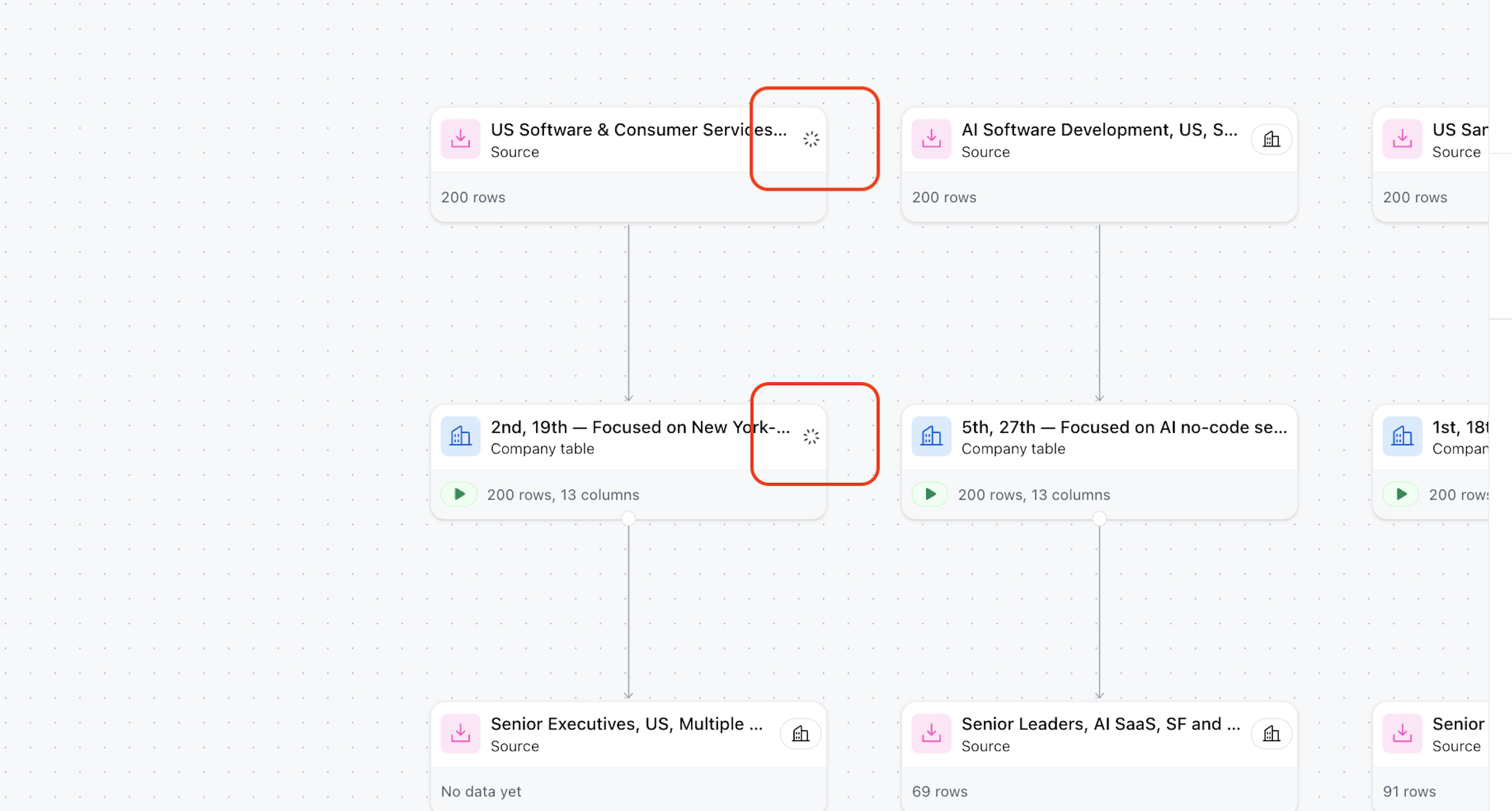
See the loading spinners inside the red boxes? That's Clay propagating your filter change downstream in real time. One edit at the company level, and every connected table updates itself.
This means you can iterate on your ICP in real time. Run outreach for a week, see what's converting, come back and tighten or loosen the filters. The lead list follows.
For GTM teams doing weekly iteration cycles, this alone saves hours.
4. Column-level filters, used deep, = ClayQL
You don't need to learn ClayQL syntax to use ClayQL-level filtering.
Open any column's filter menu. Click into the conditions. You'll find way more options than you'd expect — exact match, contains, starts with, regex, is empty, is not empty, greater than, less than, and combinations of all of them.
Stack these deep instead of memorizing query syntax. You get the same precision without the learning curve. And because it's visual, your teammates can read and modify your filters without asking you what the query means.
Bonus: Watch the credit-burners
The #1 thing that kills free-tier users: work email lookups.
Here's the reality:
- Work email enrichment has roughly a 50% hit rate
- In practice, customers only request work emails on about 10% of leads (most outreach goes through LinkedIn, not cold email)
- Clay only charges a credit when an email is actually found
So your starting 1,000 credits go much further than you'd think. And as cold email response rates stay low, even that 10% email-request rate trends down over time.
Clay's free tier is more than enough. Hit the ceiling first. Then pay. Don't pre-optimize for a problem you don't have yet.
What's next
So now you have the Clay workflow down. But there's a missing piece: what LinkedIn account do you actually need to run this?
Free LinkedIn? Sales Navigator? Premium? The answer matters more than you'd think — and it's not what most people recommend.
Next post.